Add live chat to your trade website: 2026 guide
10 July 2026 · 3 min read
Add live chat to your trade website: 2026 guide

Live chat is defined as a real-time messaging widget embedded directly into a website, allowing visitors to ask questions and receive answers without leaving the page. For UK trade and service businesses, the decision to add live chat to a trade website is one of the most direct ways to turn passive visitors into active enquiries. Live chat visitors convert at 2.8 times the rate of those without real-time support, and they spend up to 60% more per purchase. That is not a marginal gain. It is a structural advantage that most trade websites are currently leaving unused.
What do you need before adding live chat to your trade website?
Before you install anything, you need three things in place: access to your website’s admin panel or code editor, a clear idea of which pages matter most to your enquiry flow, and a live chat platform that suits a trade business’s working patterns.
Choosing the right platform type
The live chat market splits broadly into two categories. Entry-level tools offer a simple widget with basic messaging and offline forms. More capable platforms add AI chatbot support, CRM integration, and conditional display logic. For trade businesses handling quote requests, call-backs, and service area questions, the more capable category is worth the modest additional cost.
Key features to look for when selecting a platform:
- AI chatbot support to handle out-of-hours queries without manual effort
- CRM integration so every conversation is logged alongside your other customer data
- Customisation options covering colours, logo placement, and chat window position
- Business hours configuration with offline message capture and email follow-up
- Conditional display to show the widget only on specific pages
Pro Tip: Check whether your chosen platform offers a WordPress plugin, a Shopify app, or a plain JavaScript snippet. Having all three options available gives you flexibility if your website platform changes.
Understanding the basic terminology

A chat widget is the button or window visitors see on your site. The embed code is the snippet of JavaScript you paste into your website to make it appear. A plugin is a packaged version of that code for platforms like WordPress, which installs without touching raw code. Knowing these three terms means you can follow any platform’s setup guide without confusion.
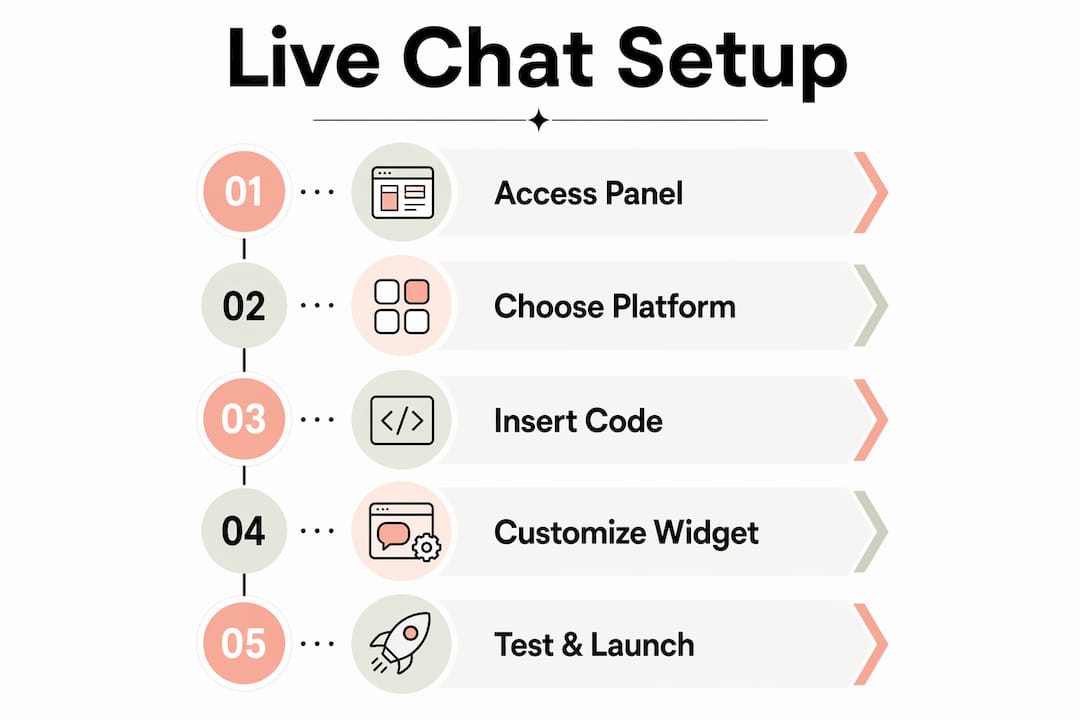
How to install live chat on your trade website step-by-step
Installation typically takes between 5 and 30 minutes and requires no dedicated developer. The method varies slightly by platform, but the core process is consistent across all of them.
-
Create your account. Sign up with your chosen live chat provider. Complete your profile, set your business name, and upload your logo during onboarding. Most platforms walk you through this in under five minutes.
-
Generate your embed code or install the plugin. Inside your dashboard, locate the installation section. You will find either a JavaScript snippet to copy or a direct link to a plugin for your platform.
-
Install on your platform. The method depends on your website setup:
| Platform | Installation method | Typical time |
|---|---|---|
| WordPress | Install the provider’s plugin via Plugins > Add New, then activate | 5 minutes |
| WordPress (manual) | Paste the JavaScript snippet into your theme’s header.php or via a header script plugin | 10 minutes |
| Shopify | Add the snippet to your theme’s theme.liquid file inside the <head> tag |
10 minutes |
| Custom HTML site | Paste the snippet before the closing </body> tag on every page |
15–30 minutes |
-
Configure basic settings. Set your business name, operator name, and initial greeting message before going live. A blank or default greeting loses the first impression immediately.
-
Test before publishing. Open your website in a private or incognito browser window and send yourself a test message. Check that the widget appears correctly on both desktop and mobile. Testing in incognito mode and across multiple devices is an industry best practice that prevents lost leads from broken installations.
Pro Tip: After installation, check your website’s page speed score using Google PageSpeed Insights. Some chat widgets add load time. If your score drops significantly, ask your provider about an asynchronous loading option, which loads the widget after the rest of your page.
For a broader view of how your website setup affects lead generation, the gtwelve guide on trade website setup for UK trades covers platform-specific configuration in detail.
How to customise live chat for your trade business
Installing the widget is the technical step. Configuring it correctly is where the real work happens. Successful live chat implementation requires planning business hours and routing workflows, not just the technical installation. Treat the chat as a lead-routing tool, not a contact form.
Brand and appearance settings
Match the chat widget’s colours to your website’s primary palette. Place your logo in the chat header. Position the widget in the bottom-right corner as a default, since that is where visitors expect to find it. These small adjustments make the widget feel like part of your site rather than a third-party add-on.
Welcome messages and page context
Write a welcome message that reflects the page the visitor is on. A visitor on your boiler servicing page has a different question than one on your contact page. Most platforms allow you to set different trigger messages per URL. Use that feature. A message like “Need a quote for boiler servicing in your area? We can help right now.” converts far better than a generic “Hello, how can we help?”
Business hours and offline handling
Most live chat platforms allow business hours configuration with offline message capture and email follow-up. Set your hours to match your actual availability. Outside those hours, the widget should switch to an offline form that captures the visitor’s name, number, and query. That data feeds directly into your follow-up process the next morning.
Conditional display and high-intent pages
Showing the chat widget only on high-intent pages such as your contact, quote, or service pages keeps your site design clean and the chat contextually relevant. Displaying it site-wide, including on blog posts and privacy pages, dilutes its impact and increases unnecessary notifications for your team.
- Show the widget on: service pages, quote request pages, contact page, and location pages
- Hide the widget on: blog posts, terms and conditions, privacy policy, and thank-you pages
CRM and lead routing
Integrating live chat with your CRM or unified inbox means every conversation is logged and actionable. Trade businesses benefit from capturing conversation history alongside email and phone records. Without this integration, chat leads sit in a separate inbox and get missed. With it, every enquiry enters the same workflow as your other leads.
What mistakes should trade businesses avoid with live chat?
The most common failure is treating live chat as a static contact form. Beginner implementations commonly fail because the chat is not connected to automated workflows or CRM notifications. The result is a widget that collects messages nobody reads until the following week.
“Live chat only delivers results when it is treated as an integral part of the sales workflow, not just an online presence. A widget without a process behind it is just decoration.”
Specific mistakes to avoid:
- Skipping AI training. Businesses that fail to train AI bots or set clear expectations between bot and human agents see lower conversion rates. Feed your chatbot with your most common questions, your service areas, and your pricing structure.
- Using generic settings. Default greetings and default colours signal to visitors that nobody has thought about their experience. Customise everything.
- Ignoring mobile testing. A widget that overlaps your mobile menu or obscures your call-to-action button will frustrate visitors and increase bounce rates.
- Skipping post-launch review. Check your chat analytics weekly for the first month. Look at which pages generate the most conversations, what questions repeat most often, and where visitors drop off without sending a message.
For more on converting website visitors into qualified leads, the gtwelve article on how modern websites generate leads covers the full picture.
Key takeaways
Live chat converts trade website visitors at a measurably higher rate when it is installed correctly, customised to match the business, and connected to a real lead-management workflow.
| Point | Details |
|---|---|
| Installation is quick | Most platforms take 5–30 minutes to install with no developer required. |
| Customisation drives results | Page-specific greetings and brand-matched styling improve engagement significantly. |
| CRM integration is non-negotiable | Without it, chat leads are isolated and frequently missed. |
| Conditional display improves quality | Showing the widget only on high-intent pages keeps conversations relevant. |
| Post-launch review matters | Weekly analytics checks in the first month reveal what is working and what needs adjustment. |
Live chat in trade: what I have actually seen work
Trade businesses are often sceptical about live chat. The assumption is that their customers prefer a phone call, and that a chat widget will just attract tyre-kickers. That assumption is wrong, and the data backs it up. The visitors who use live chat on a trade website are often the ones who have already decided they want the service. They just have one or two questions before they commit.
What I have seen make the biggest difference is not the platform choice. It is the integration. When a chat conversation automatically creates a contact record, triggers a follow-up email, and notifies the right person on the team, the lead does not get lost. When it does not, the lead almost always does. The businesses that get the most from live chat are the ones that treat it the same way they treat a phone call: someone picks up, they take a note, and they follow up.
The second thing that consistently matters is page targeting. A chat widget on every page of a trade website is noise. A chat widget on the boiler servicing page, the quote request page, and the contact page is a sales tool. That distinction takes about ten minutes to configure and makes a substantial difference to the quality of conversations you receive.
If you are reviewing your website conversion rate and wondering where live chat fits, start with your three highest-traffic service pages. Add the widget there first, configure a relevant greeting, and connect it to your inbox. Review the results after four weeks before expanding further.
— Ben
How gtwelve helps trade businesses add and configure live chat
gtwelve works with UK trade and service businesses to set up live chat as part of a wider website and lead-management system, not as a standalone widget.

That means configuring the widget to match your brand, connecting it to your CRM or follow-up workflow, and targeting it to the pages where it will generate the most enquiries. gtwelve also handles the technical installation across WordPress, custom HTML sites, and other platforms, so you do not need to touch a line of code. If you want live chat that actually captures leads rather than just sitting on your homepage, visit gtwelve.co.uk to see how we can set it up for your business.
FAQ
How long does it take to add live chat to a website?
Installation takes between 5 and 30 minutes for most platforms. WordPress users can install a plugin in under five minutes, while custom HTML sites require pasting a code snippet before the closing body tag.
Do I need a developer to install live chat?
No. Most live chat providers offer plugins for WordPress and Shopify, or a simple JavaScript snippet for custom sites. No developer is required for a standard installation.
Which pages should show the live chat widget?
Show the widget on high-intent pages such as service pages, quote request pages, and your contact page. Conditional display on key pages keeps conversations relevant and reduces unnecessary notifications.
What happens to chat messages outside business hours?
Most platforms capture offline messages via a form and send them to your email for follow-up the next working day. Configure your business hours in the platform settings to switch automatically between live and offline modes.
Does live chat work for trade businesses specifically?
Live chat works particularly well for trade businesses because visitors on service pages are often ready to enquire. Connecting chat to a CRM ensures those enquiries enter your standard follow-up process rather than being lost in a separate inbox.
Recommended
If this sounds like your website, we can take a look.
Note 14 of 72