How to track website enquiries and conversions
20 May 2026 · 3 min read
How to track website enquiries and conversions

Most businesses have some form of analytics installed on their website, yet very few can confidently say where their best enquiries actually come from. If you want to track website enquiries and conversions accurately, you need more than a page view counter. You need a deliberate setup that captures the right events, attributes them to the right sources, and feeds clean data into your marketing decisions. This guide covers the tools, the setup steps, and the common mistakes that quietly corrupt your numbers.
Table of Contents
Key takeaways
| Point | Details |
|---|---|
| Define conversions precisely | Decide exactly what counts as an enquiry before you configure any tracking tool. |
| Use GA4 key events correctly | Mark only meaningful actions as key events to avoid feeding poor signals to Smart Bidding. |
| Verify before you trust the data | Check tag firing, cookies, and live reports before making any decisions based on the numbers. |
| Deduplication prevents inflated data | Running client-side and server-side tracking together without deduplication distorts your cost-per-lead figures. |
| Qualified leads beat raw volume | Tracking only form submissions misses lead quality; connect your CRM to capture what actually converts. |
Tools you need to track enquiries and conversions
Before you touch a single tag or event, you need the right tools in place and a clear idea of what you are measuring.
The core toolkit
Three tools form the foundation of most tracking setups for UK service businesses:
-
Google Analytics 4 (GA4): Records user behaviour, events, and key conversion actions on your website. It is free and connects directly to Google Ads.
-
Google Tag Manager (GTM): A tag management system that lets you deploy and update tracking scripts without editing your website’s code directly.
-
Google Ads conversion tracking: Measures actions that happen after someone clicks your ad, using Google Tag as the signal carrier.
Your website also needs to be technically capable of running these scripts. Most platforms, including WordPress, Wix, and Squarespace, support this, though the method varies by platform.
What counts as a conversion?
This is where most setups go wrong before they even begin. Defining conversions precisely is critical to avoid optimising for the wrong metrics, such as page visits that have nothing to do with revenue.
For a service business, a conversion is typically one of the following:
-
A contact form submission
-
A phone call click from a mobile device
-
A quote request completion
-
A booking or appointment confirmed
-
A live chat message sent
A “key event” in GA4 is simply an event you have toggled as significant. A “conversion action” in Google Ads is what you import from GA4 or set up directly in the Ads interface. Understanding this distinction matters because, as GA4 separates measurement from bidding, misclassifying events affects how Smart Bidding allocates your budget.
Tool comparison
| Tool | Primary use | Cost | Best for |
|---|---|---|---|
| Google Analytics 4 | Behaviour and event tracking | Free | All websites |
| Google Tag Manager | Tag deployment and management | Free | Non-developers |
| Google Ads conversion tracking | Ad attribution | Free (needs Ads account) | Paid search campaigns |
| WhatConverts | Multi-channel lead tracking | Paid | Agencies and SMEs |
Step-by-step setup for tracking enquiries
With your tools chosen and your conversions defined, here is how to build the tracking setup correctly.
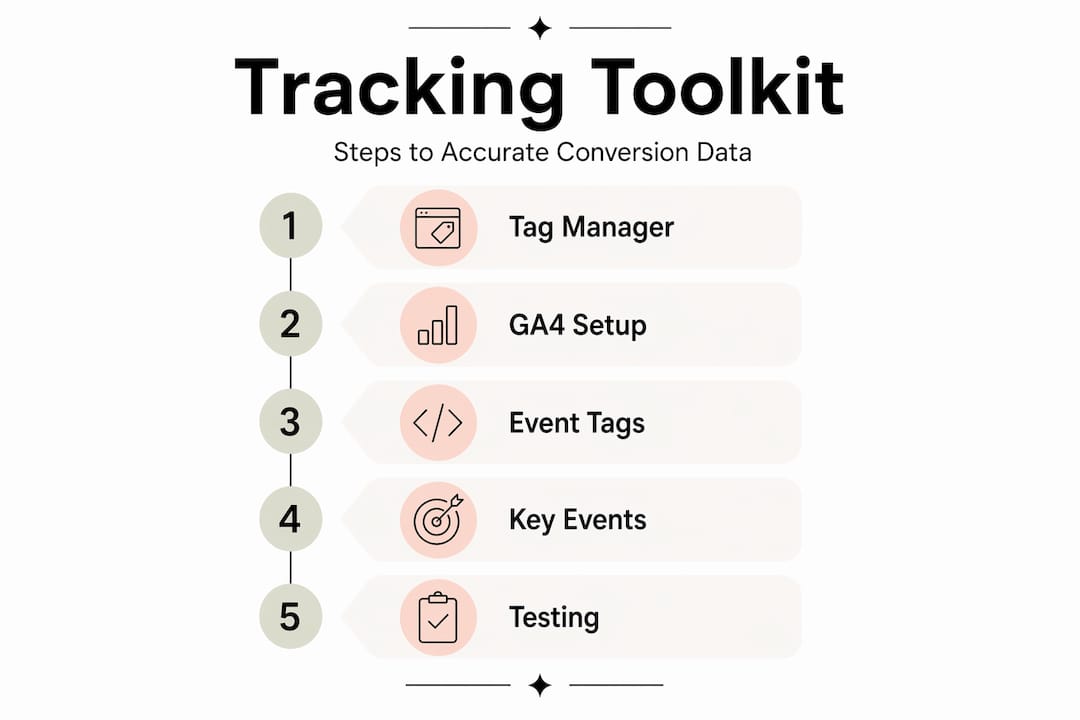
Step 1: Install Google Tag Manager on your website. Add the GTM container snippet to every page. On platforms like Wix, this means adding the script to the site header via the custom code settings.
Step 2: Set up your GA4 property and connect it via GTM. Create a GA4 property, copy the Measurement ID, then create a GA4 Configuration tag in GTM. Set it to fire on all pages.
Step 3: Create event tags for each conversion action. For a form submission, create a GA4 Event tag in GTM that fires when the form’s thank-you page loads, or when the form submit button is clicked. Tracking form submissions accurately requires using form-specific methods rather than simply counting page visits, which can miss submissions or count non-submitters.
Step 4: Mark key events in GA4. Log into GA4, go to Admin, then Events. Find your form submission event and toggle it as a key event. This tells GA4 it is a meaningful action worth reporting prominently.
Step 5: Set up Google Ads conversion tracking. In Google Ads, go to Goals, then Conversions. You can either set up Google Ads conversion tracking directly by installing Google Tag on your site, or import key events from GA4. The import route is cleaner for most businesses because it keeps your conversion data in one place.
Step 6: Handle platform-specific requirements. If your site is built on Wix, you will need to add custom tracking scripts to the site header. After installation, verify the setup by using your browser’s Inspect Element tool and checking for the relevant tracking cookies on the live site.
Step 7: Test every conversion action before going live. Submit a test form, click a phone number link, and complete a test booking. Check GA4’s real-time reports and GTM’s preview mode to confirm the events are firing correctly.
Pro Tip: Do not mark every event as a key event in GA4. Only toggle the actions that represent genuine business value. If you feed Google Ads a mix of meaningful and trivial conversions, Smart Bidding will optimise toward the wrong behaviour and your cost per real lead will rise.
Advanced tracking: server-side and deduplication
Once your basic setup is working, there are two areas worth understanding if you want more reliable data.
Client-side vs server-side tracking
Standard tracking runs in the visitor’s browser (client-side). The problem is that ad blockers, browser privacy settings, and iOS restrictions can prevent tags from firing. Client-side tracking can lose 20 to 40% of events, which means your conversion numbers may be significantly understated.
Server-side tracking sends conversion data via API from your server directly to Google, bypassing the browser entirely. The benefit is more complete data. The trade-off is greater setup complexity and ongoing maintenance.
A hybrid approach, running both methods together, is common. But it introduces a new problem: double counting.
Why deduplication matters
When both client-side and server-side tracking fire for the same event, you end up with two conversion records for one action. Deduplication by matching event IDs is the solution. Each event needs a unique ID assigned at the point of firing. Both the browser tag and the server-side call send that same ID to Google, which then discards the duplicate.
Without this, your reported ROAS and cost-per-lead figures become unreliable. You may think a campaign is performing well when the numbers are simply inflated.
Pro Tip: If you are running a hybrid setup, audit your event IDs regularly. A tagging change or platform update can quietly break deduplication and corrupt weeks of data before anyone notices.
Here is a quick comparison of the two approaches:
| Tracking method | Data reliability | Setup complexity | Blocked by ad blockers |
|---|---|---|---|
| Client-side only | Moderate | Low | Yes |
| Server-side only | High | High | No |
| Hybrid with deduplication | Highest | Medium to high | Mostly no |
Verifying your setup and fixing common problems
A tracking setup you have not verified is not a tracking setup. It is a guess.
How to verify your tracking
-
Use GTM Preview mode to confirm tags fire on the correct triggers before publishing.
-
Check GA4 real-time reports while submitting a test form to see the event appear live.
-
In Google Ads, use the Conversion Status column to confirm conversions are being recorded.
-
For platform-specific setups, verify tag installation by inspecting cookies on the live site using your browser’s developer tools.
Common problems and fixes
| Problem | Likely cause | Fix |
|---|---|---|
| No conversions recorded | Tag not firing or wrong trigger | Check GTM trigger conditions and republish |
| Double-counted conversions | Duplicate tags or no deduplication | Remove duplicate tags; add event ID matching |
| Conversions attributed to wrong source | Missing UTM parameters | Add UTM tags to all campaign URLs |
| Form submissions not tracking | Platform script restriction | Add tracking script to site header manually |
| GA4 shows events but Ads does not | Import not configured | Import key events from GA4 into Google Ads |
One issue that does not show up in these tables but causes real problems: only tracking the initial form submission without measuring lead quality. Counting only form submit events inflates your lead volume and gives you a misleading picture of which campaigns are actually working. Connecting your CRM to push qualified lead data back into GA4 gives you a far more accurate signal for optimisation.
Pro Tip: Set up a separate key event in GA4 for qualified leads, not just form submissions. If your CRM can push a data point back to GA4 when a lead is marked as qualified, you can then use that event in Google Ads bidding. Your campaigns will start optimising toward leads that actually convert, not just anyone who fills in a form.
My honest take on conversion tracking
I have worked with enough service businesses to know that most of them are not flying blind because they lack tools. They are flying blind because they set up tracking once, assumed it was working, and never checked it again.
The most common mistake I see is treating raw enquiry volume as the success metric. A campaign that generates 40 form submissions a month looks great until you realise 30 of them are tyre-kickers or wrong-fit enquiries. The businesses that get the most out of their tracking are the ones that analyse visitor behaviour through funnel stages and measure what happens after the initial contact, not just whether contact was made.
My honest advice: start simple. Get your GA4 key events right, verify them properly, and connect your Google Ads account before worrying about server-side tracking. Most small and medium-sized service businesses do not need a complex hybrid setup on day one. They need accurate, clean data on the basics first.
What I have found actually moves the needle is defining a qualified lead event and getting that into your bidding strategy. That single change, connecting CRM data back to GA4, often produces better campaign results than any amount of budget adjustment. It is also the thing most businesses never bother to do because it requires a bit of backend work.
Test your setup every quarter. Platforms update, plugins change, and tags break silently. Clean data is not a one-time achievement. It is something you maintain.
— Ben
How Gtwelve can help you track and grow

If setting up and maintaining accurate conversion tracking feels like more work than your team has capacity for, Gtwelve builds it into the foundation of every website we create. Our conversion-focused website solutions are designed for UK service businesses that want to know exactly where their enquiries come from and which channels are worth investing in. We connect your website enquiries into practical business systems, including quote workflows, follow-up sequences, and reporting, so your data does not just sit in a dashboard. It drives decisions. If you want cleaner attribution, better lead quality, and less manual admin, get in touch with Gtwelve to see how we approach it.
FAQ
What is the best way to track website enquiries?
The most reliable method is to set up event tracking in Google Analytics 4 for specific actions such as form submissions, phone call clicks, and booking completions. Use Google Tag Manager to deploy tags without editing your site code directly.
How do I track conversions online using GA4?
Create event tags for each conversion action, then toggle them as key events in GA4 under Admin, Events. Import those key events into Google Ads to use them in campaign reporting and Smart Bidding.
Why are my conversion numbers higher than expected?
Double counting is the most common cause. If you are running both client-side and server-side tracking without deduplication, each conversion may be recorded twice. Audit your tags and implement event ID matching to resolve this.
What counts as a conversion for a service business website?
A conversion is any action that indicates genuine interest, such as a completed contact form, a quote request, a phone call click, or a confirmed booking. Page visits and time on site are not conversions.
How do I know if my tracking is set up correctly?
Use GTM Preview mode to confirm tags fire on the right triggers, then check GA4 real-time reports while submitting a test form. In Google Ads, review the Conversion Status column to confirm data is flowing through correctly.
Recommended
If this sounds like your website, we can take a look.
Note 71 of 72