Website accessibility explained: a 2026 guide
23 June 2026 · 3 min read
Website accessibility explained: a 2026 guide

Website accessibility is the practice of designing and building digital content so that every person, including those with disabilities, can perceive, understand, navigate, and interact with it without barriers. The industry standard framework for achieving this is the Web Content Accessibility Guidelines, known as WCAG, which is built on four core principles: Perceivable, Operable, Understandable, and Robust, collectively called POUR. Understanding website accessibility matters for web developers, business owners, and marketers alike because it affects legal compliance, search visibility, and the size of the audience you can actually reach. Accessibility is not a niche concern. It is a fundamental quality standard for any professional website in 2026.
What are the key principles and guidelines that shape website accessibility?
The POUR principles are the foundation of WCAG 2.2, the internationally recognised standard as of 2026. Each principle defines a category of barrier that a website must not create.
- Perceivable: All content must be presentable to users in ways they can detect. This includes providing alt text for images, captions for video, and sufficient colour contrast for text.
- Operable: All functionality must work via keyboard, not just a mouse. Users who rely on switch controls or keyboard navigation must be able to reach every interactive element.
- Understandable: Content and interfaces must be clear. Error messages must explain what went wrong, and language must be set correctly in the HTML so screen readers pronounce words accurately.
- Robust: Code must be written to a standard that current and future assistive technologies can interpret reliably. Semantic HTML is the primary tool here.
WCAG 2.2 and its conformance levels
WCAG 2.2, released in october 2023, adds nine new success criteria targeting cognitive, motor, and low-vision impairments. The standard defines three conformance levels.

| Level | Description | Practical implication |
|---|---|---|
| A | Minimum baseline | Removes the most critical barriers; not sufficient for legal compliance |
| AA | Industry standard | Required for legal compliance in most jurisdictions; the practical target |
| AAA | Highest level | Addresses the widest range of needs; often impractical for all content |
Level AA is the target for the vast majority of websites. Level AAA is the highest but is widely considered impractical to achieve across an entire site. New WCAG 2.2 criteria include focus appearance improvements and dragging movement alternatives, both of which directly help users with motor impairments.
Pro Tip: Do not treat WCAG conformance levels as a ladder to climb one step at a time. Target Level AA from the start of your project. Retrofitting Level A sites to reach AA later costs significantly more time and budget.
Why is website accessibility essential for business success and legal compliance?
Accessibility is a legal requirement in most major markets, not an optional enhancement. ADA Title III requires WCAG 2.1 Level AA compliance for public business websites in the United States, and the 2024 Title II rule extended similar mandates to government sites. In the UK, the Equality Act 2010 requires service providers to make reasonable adjustments so that disabled people can access services, which courts and regulators increasingly interpret to include digital services.
The business case is equally direct:
- Market size: Over one billion people worldwide live with some form of disability. Inaccessible websites exclude a substantial portion of potential customers.
- SEO benefits: Accessible websites use semantic HTML, descriptive link text, and structured headings. These are the same signals that search engines use to index and rank content.
- Reduced legal risk: Non-compliance exposes businesses to litigation, regulatory penalties, and reputational damage. Accessibility lawsuits in the US have risen sharply over the past decade.
- Broader usability: The curb cut effect describes how accessibility improvements benefit users beyond those with disabilities, including mobile users, people with temporary injuries, and those on slow connections.
“Accessibility is about more than compliance. It is about building products that work for the full range of human diversity.” — Level Access, Web Accessibility in 2026
The importance of web accessibility for SMEs is growing as digital services become the primary point of contact between businesses and their customers. A website that excludes users with disabilities is a website that loses enquiries, conversions, and trust.
How can web developers and business owners implement website accessibility?
Integrating accessibility from the initial design stage using semantic HTML and accessibility APIs reduces costly retrofitting later. Treating it as an afterthought consistently produces more expensive and less effective results. A structured approach works best.
- Audit your current site. Use automated tools such as WAVE or Axe to identify obvious issues. These tools catch a meaningful proportion of problems quickly and at no cost.
- Fix structural issues first. Address heading hierarchy, missing alt text, poor colour contrast, and unlabelled form fields. These affect the widest range of users and are straightforward to correct.
- Test with assistive technologies. Use screen readers such as NVDA on Windows or VoiceOver on macOS and iOS to experience your site as a blind or low-vision user does. Keyboard-only navigation testing is equally important.
- Involve real users. Testing with people who use assistive technologies daily surfaces issues that automated tools and developer testing miss entirely.
- Build accessibility into your workflow. Add accessibility checks to your design review, code review, and QA processes. This keeps standards from slipping as the site evolves.
Automated versus manual testing
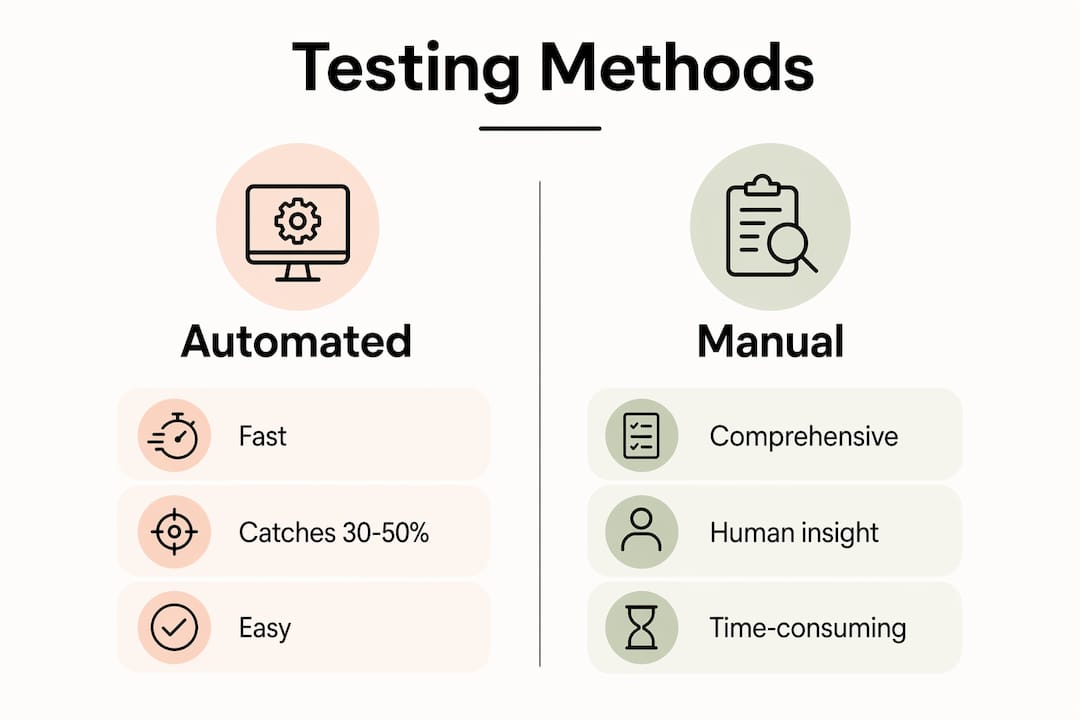
Automated testing tools catch roughly 30–50% of accessibility issues. That figure is significant but leaves the majority of problems undetected. Manual assessments and assistive technology testing are necessary to address navigation flows, cognitive understanding, and complex interactive components such as date pickers and modal dialogues. Effective auditing combines both approaches.
Pro Tip: Run Axe or WAVE on every new page before it goes live. This takes under two minutes and catches the most common errors before they reach your users.
A website redesign is the ideal moment to build accessibility in from the ground up rather than patching an existing site. If you are planning a redesign, include WCAG 2.2 Level AA as a defined deliverable in your brief.
What common challenges and misconceptions exist around website accessibility?
The single biggest barrier to good accessibility is a lack of formal training. A WebAIM survey found that 93% of web accessibility practitioners had no formal education in the field. Most knowledge is self-taught, which means gaps are common and inconsistent across teams. This is not a criticism of developers. It reflects how rarely accessibility appears in formal web development curricula.
Several persistent myths also slow progress:
- “Accessibility is only for blind users.” Accessibility covers visual, auditory, motor, cognitive, and speech impairments. It also benefits users with temporary conditions such as a broken arm or situational limitations such as bright sunlight on a screen.
- “Making a site accessible is prohibitively expensive.” Building accessibility in from the start adds minimal cost. Retrofitting an inaccessible site is expensive. The cost argument almost always applies to the wrong scenario.
- “Compliance equals accessibility.” Strict focus on compliance alone leads to check-box accessibility, which leaves users with disabilities unable to complete key tasks such as purchases or form submissions. Passing an automated audit does not mean your site is usable.
- “Accessibility harms design.” Accessible design constraints, such as sufficient colour contrast and clear focus indicators, consistently produce cleaner, more usable interfaces for everyone.
WCAG 2.1 Level AA is the practical benchmark that balances effective barrier removal with real-world feasibility. Chasing Level AAA across an entire site is rarely the right use of development resources. The goal is meaningful usability, not a perfect score on a checklist.
Organisational challenges are equally real. Accessibility requires buy-in across design, development, content, and leadership. A developer who cares about accessibility cannot compensate for a content team that publishes images without alt text or a designer who specifies insufficient contrast ratios. Accessibility works when it is treated as a shared standard, not a single person’s responsibility.
Key takeaways
Website accessibility is a legal requirement, a business opportunity, and a quality standard that improves outcomes for every user on your site.
| Point | Details |
|---|---|
| POUR principles are the foundation | Every accessible website must be Perceivable, Operable, Understandable, and Robust. |
| WCAG 2.2 Level AA is the target | Level AA is the legal and industry standard; build to it from the start, not as a retrofit. |
| Automated tools have limits | Tools like WAVE and Axe catch 30–50% of issues; manual and assistive technology testing is essential. |
| Compliance is not enough | Check-box accessibility frustrates users; the real goal is meaningful usability for all. |
| Accessibility benefits everyone | The curb cut effect means accessible design improves experience for mobile users, temporary impairments, and slow connections. |
Accessibility as a mindset, not a milestone
I have worked on enough website projects to say this plainly: the businesses that treat accessibility as a one-time task almost always end up with a site that fails users and eventually creates legal exposure. The ones that get it right treat it the same way they treat security or performance. It is a standard that runs through every decision, not a box to tick before launch.
What surprises most business owners is how much accessible design improves the experience for everyone. When you write clear link text, structure your headings logically, and make forms easy to complete, you are not just helping screen reader users. You are making your site faster to use for every visitor. That translates directly into better conversion rates and fewer abandoned enquiries.
The technical side is genuinely learnable. Semantic HTML, ARIA labels, and keyboard focus management are not advanced concepts. What takes longer is building the habit of checking accessibility at every stage rather than discovering problems after launch. Start with a WAVE or Axe audit today. Fix the obvious issues. Then test your site with a keyboard and a screen reader. You will learn more in thirty minutes of that kind of testing than in hours of reading guidelines.
The relationship between website design and user trust is direct. An accessible site signals that you take your users seriously. That matters to customers, to search engines, and increasingly to regulators.
— Ben
How gtwelve approaches accessible website design
gtwelve builds websites for UK service businesses with WCAG 2.2 Level AA compliance as a standard deliverable, not an optional add-on.

If your current site has not been audited for accessibility, you are likely losing enquiries from users who cannot navigate it and creating legal exposure you may not be aware of. gtwelve combines professional website design with technical SEO, structured content, and ongoing maintenance to keep your site performing and compliant. Get in touch to find out how we can assess your current site and build a plan that works for your business.
FAQ
What does website accessibility mean?
Website accessibility means designing and building digital content so that people with disabilities can perceive, use, and understand it without barriers. It covers visual, auditory, motor, and cognitive impairments.
What is WCAG and which version applies in 2026?
WCAG stands for Web Content Accessibility Guidelines. WCAG 2.2, released in october 2023, is the current standard and adds nine new success criteria targeting cognitive, motor, and low-vision needs.
Is website accessibility a legal requirement in the UK?
The Equality Act 2010 requires UK service providers to make reasonable adjustments for disabled people, which includes digital services. Public sector websites have additional obligations under the Public Sector Bodies Accessibility Regulations.
What is the difference between WCAG Level A, AA, and AAA?
Level A is the minimum baseline, Level AA is the legal and industry standard required for most websites, and Level AAA is the highest level but is generally impractical to achieve across an entire site.
How do I start improving my website’s accessibility?
Run a free audit using WAVE or Axe to identify immediate issues, then fix heading structure, alt text, colour contrast, and form labels. Follow up with keyboard-only navigation testing and, where possible, testing with a screen reader.
Recommended
If this sounds like your website, we can take a look.
Note 31 of 72