What is Google Business Profile: a guide for UK small businesses
5 July 2026 · 3 min read
What is Google Business Profile: a guide for UK small businesses

A Google Business Profile is a free tool that controls how your business appears on Google Search and Google Maps, displaying your name, address, phone number, opening hours, photos, and customer reviews. Formerly known as Google My Business, the platform was rebranded in 2021 to better reflect its role as a direct business listing rather than a separate app. Maintaining an active profile boosts clicks to your website by up to seven times, making it one of the highest-return free tools available to UK small businesses. For trades, local service providers, and SMEs, this listing is often the first thing a potential customer sees before they ever reach your website.
What is a Google Business Profile and what does it include?
A Google Business Profile is defined as the public-facing listing Google displays when someone searches for your business or a related service in your area. It pulls together your core business details into a single, structured panel visible on both Google Search and Google Maps. Businesses with complete profiles are easier to match with relevant local searches, which directly improves your ranking and the volume of calls and visits you receive.
The profile includes a wide range of features you control:
- Business name, address, and phone number — the foundation of your local listing, often called NAP data
- Opening hours — including special hours for bank holidays or seasonal changes
- Photos and videos — images of your premises, team, work, or products that build trust before a customer contacts you
- Customer reviews — star ratings and written feedback, with the option for you to respond publicly
- Google Posts — short updates, promotions, or announcements that appear directly on your profile
- Services and products list — a structured breakdown of what you offer, with descriptions and prices where relevant
- Website link and booking button — direct routes for customers to take the next step
- Questions and answers — a public FAQ section where customers or you can post and answer common queries
- Messaging — an optional feature allowing customers to contact you directly through the profile
Each of these features serves a specific purpose. Photos increase engagement. Reviews build credibility. Posts keep the listing fresh. Together, they turn a static directory entry into an active customer acquisition tool.
How does claiming and managing your Google Business Profile work?

The distinction between a Business Profile and a Google Business Profile account is one most small business owners miss. The Business Profile is the public listing, visible to anyone on Google. The account is the management dashboard you log into to edit and control that listing. Critically, profiles can exist on Google before any business owner claims them. An unclaimed profile risks displaying incorrect information or being edited by others.
Claiming your profile follows these steps:
- Search for your business name on Google Search or Google Maps while logged into your Google account.
- If a listing exists, select “Claim this business.” If not, choose “Add your business to Google.”
- Complete your business details accurately, including your category, address, and contact information.
- Choose a verification method. Google offers verification by postcard, phone call, email, or video recording depending on your business type and location.
- Once verified, you gain full control to edit, update, and respond to reviews.
Since 2022, the dedicated Google My Business app has been retired. You now manage your profile directly through Google Search or Google Maps when logged into your account. Many business owners still search for a standalone app, which no longer exists. Managing through Search is straightforward: simply search your business name and the editing options appear in the results panel.
Pro Tip: Watch out for duplicate listings. If your business appears twice on Google, it confuses customers and splits your reviews. Report duplicates through the “Suggest an edit” option or flag them via Google Business Profile support.
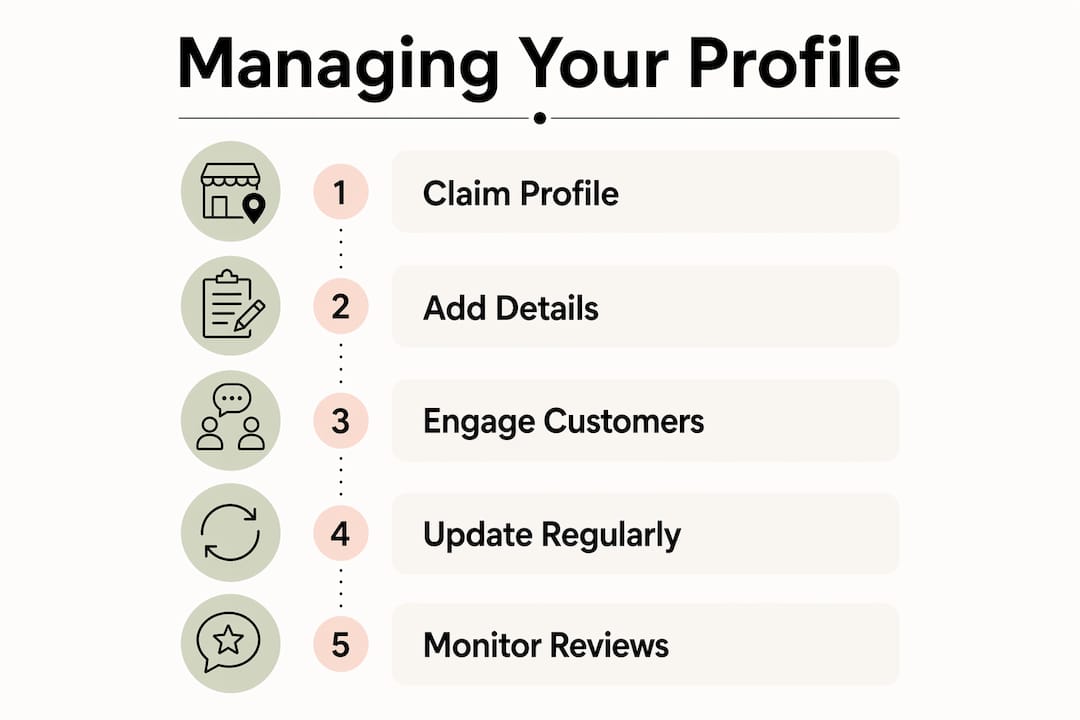
Keeping your profile accurate is an ongoing task, not a one-off setup. Update your hours before bank holidays, add new photos regularly, and check that your address and phone number match what appears on your website. Inconsistencies between your profile and your website are a common local SEO error that costs businesses rankings and trust.
What are the benefits of an optimised Google Business Profile for local SEO?
A well-managed Google Business Profile acts as a local digital storefront, and for many customers it replaces your website as the first point of contact. A customer searching “plumber near me” or “electrician in Leeds” sees a map pack of three local results before any organic website listings. Getting into that map pack depends heavily on how complete and active your profile is.
The direct benefits of an optimised profile include:
- Higher local search rankings — Google rewards complete, regularly updated profiles with better placement in local results
- More direct customer actions — calls, direction requests, and website clicks all happen from the profile without the customer needing to visit your site
- Improved trust through reviews — a business with 40 reviews and a 4.7-star rating converts far better than one with no reviews at all
- Fresh content signals — Google Posts keep your listing active, signalling to Google that your business is current and engaged
- AI-driven visibility — Google increasingly uses Business Profile data in AI-generated local summaries and featured answers in Search
Google’s use of profile data in AI summaries is a significant development for 2026. When someone asks Google a question like “Who is the best roofer in Bristol?”, the AI overview pulls from structured profile data including reviews, categories, and business descriptions. A sparse or unclaimed profile simply does not appear in these results.
Reviews deserve particular attention. Responding to every review, positive or negative, signals to Google that you are an active business. It also shows prospective customers that you take your reputation seriously. A business that replies thoughtfully to a critical review often earns more trust than one with only five-star ratings and no engagement.
How to maximise your Google Business Profile impact
Consistent activity on your profile produces better results than a single burst of effort at setup. The businesses that perform best in local search treat their profile as a living part of their marketing, not a box ticked once.
Pro Tip: Set a monthly reminder to review your profile. Check your hours, add at least one new photo, publish a Google Post, and respond to any unanswered reviews or questions. Thirty minutes a month makes a measurable difference to your local visibility.
The most effective ongoing practices are:
- Post regularly using Google Posts — share a completed job, a seasonal promotion, or a new service. Posts expire after seven days, so weekly or fortnightly posting keeps your profile visually active.
- Encourage reviews proactively — ask satisfied customers directly, either in person or via a follow-up message. A direct link to your review page makes it easy for them.
- Add photos consistently — businesses with more than ten photos receive significantly more engagement than those with one or two. Show your team, your work, and your premises.
- Answer questions in the Q&A section — if no one has asked questions yet, add your own common ones and answer them. This pre-empts customer queries and improves your profile’s completeness.
- Monitor your insights — Google provides data on how many people viewed your profile, clicked your website, called you, or asked for directions. Use this to understand which actions your listing drives.
Integrating your profile with your wider digital presence compounds the results. Your website’s local SEO and your Google Business Profile work together. Schema markup on your website, consistent NAP data across all platforms, and a well-structured site all reinforce your profile’s authority. For a full picture of what your online presence needs, the trade business visibility checklist from gtwelve covers the key areas to address in 2026.
Key takeaways
A Google Business Profile is the single most cost-effective local marketing tool available to UK small businesses, and an unclaimed or incomplete profile actively costs you customers and search visibility.
| Point | Details |
|---|---|
| Free and high-impact | An active profile boosts website clicks by up to seven times at no cost. |
| Claim your listing first | Unclaimed profiles can display wrong information and are a risk to your reputation. |
| Manage via Search or Maps | The Google My Business app was retired in 2022; use Google Search or Maps to edit your profile. |
| Reviews drive conversions | Responding to reviews builds trust and signals to Google that your business is active. |
| Consistent activity wins | Regular posts, photos, and updated hours outperform a one-time setup in local search rankings. |
Why most small businesses are getting this wrong
Working with UK trades and service businesses, I see the same pattern repeatedly. The owner set up a Google Business Profile two or three years ago, uploaded one photo, and has not touched it since. The listing exists, but it is doing almost nothing. No posts, no review responses, no updated hours. Meanwhile, a competitor with a newer business but an active profile is appearing above them in local search every single day.
The platform change in 2022 made things worse for many businesses. When Google retired the standalone app, a lot of owners simply stopped logging in. They assumed the profile was running itself. Profile management now happens directly in Google Search and Maps, which is actually more convenient once you know where to look. But the transition confused enough people that many profiles went dormant.
The other mistake I see constantly is treating the profile as separate from the website. They are not separate. Google cross-references your profile data with your website. If your address on your profile says “Unit 4, High Street” and your website says “4 High Street,” Google notices the discrepancy. That inconsistency quietly suppresses your local rankings. Fixing it takes five minutes and can move you up the map pack within weeks.
The businesses that treat their Google Business Profile as a genuine marketing channel, not an afterthought, consistently outperform those that do not. The profile acts as a conversion engine before a customer even reaches your website. If you are not actively managing it, you are handing that advantage to someone else.
— Ben
How gtwelve helps UK small businesses get found locally
Getting your Google Business Profile right is one part of a broader local visibility picture. At gtwelve, we work with UK trades, service businesses, and SMEs to build the full system: profile optimisation, technical SEO, and websites that convert enquiries into work.

If your profile is incomplete, your website is not backing it up, or you are not sure why competitors are appearing above you in local search, we can help. Our local SEO and website services are built specifically for UK service businesses that want to generate better enquiries without spending hours managing it themselves. Visit gtwelve.co.uk to find out what your online presence is missing.
FAQ
What is a Google Business Profile?
A Google Business Profile is a free listing that controls how your business appears on Google Search and Google Maps, showing your contact details, hours, photos, and customer reviews.
What is a Google Business Post?
A Google Post is a short update published directly on your profile, used to share promotions, news, or announcements. Posts are visible in Search and Maps and expire after seven days.
Is Google Business Profile the same as Google My Business?
Yes. Google rebranded Google My Business to Google Business Profile in 2021. The dedicated app was retired in 2022, and management now takes place through Google Search and Google Maps.
How do I claim my Google Business Profile?
Search for your business name on Google while logged into your Google account, then select “Claim this business.” You will need to verify ownership by postcard, phone, email, or video, depending on your business type.
Does a Google Business Profile help with local SEO?
A complete and active profile directly improves your local search ranking. Businesses with full profiles are matched more accurately to relevant local searches, which increases calls, direction requests, and website visits.
Recommended
If this sounds like your website, we can take a look.
Note 19 of 72