Schema markup for a local business website: 2026 guide
20 June 2026 · 3 min read
Schema markup for a local business website: 2026 guide

Schema markup for a local business website is structured data embedded in your site’s code that tells search engines and AI systems exactly who you are, where you operate, and what you offer. Google Search, Perplexity, and AI-driven results all draw on this data to generate rich results, Knowledge Panels, and map listings. Without it, search engines must guess at your business details. With it, you give them certainty. For UK SMEs competing in local search, that certainty translates directly into better visibility, more qualified enquiries, and a stronger digital presence.
What schema markup for a local business website actually requires
The formal industry term for this practice is structured data, and the vocabulary used is defined by Schema.org, a shared standard supported by Google, Bing, and Yahoo. Schema markup is simply the method of applying that vocabulary to your web pages.
The most important schema type for any local business is LocalBusiness. This is not a generic catch-all. Schema.org defines dozens of specific subtypes, including Plumber, Electrician, DentalClinic, LegalService, and AutoRepair. Using the most specific subtype available tells search engines precisely what your business does, which improves relevance in local queries.
Required vs recommended properties
Four required fields establish the minimal valid schema to avoid rejection by Google’s structured data parser. These are:
- @type — your specific business subtype (e.g.
Plumber, not justLocalBusiness) - name — your exact trading name as it appears on your Google Business Profile
- address — formatted as a
PostalAddressobject with street, city, and postcode - telephone — your primary contact number in full international format
Beyond these four, six recommended fields significantly improve your eligibility for rich search features. These are geo (latitude and longitude coordinates), openingHoursSpecification, url, image, priceRange, and sameAs (links to your Google Business Profile, Facebook page, and other authoritative listings).
| Property | Type | SEO benefit |
|---|---|---|
| @type (specific subtype) | Required | Precise entity classification for local queries |
| name | Required | Confirms business identity across search systems |
| address (PostalAddress) | Required | Enables map listings and local pack eligibility |
| telephone | Required | Supports click-to-call features in mobile results |
| geo (GeoCoordinates) | Recommended | Improves map accuracy and proximity signals |
| openingHoursSpecification | Recommended | Enables opening hours display in rich results |
| image | Recommended | Supports visual rich results and Knowledge Panels |
| sameAs | Recommended | Links entity across platforms, strengthening trust |
Supplementary schema types worth adding include Service (on individual service pages), Review, FAQPage, and Organization. Each adds a layer of context that helps search engines build a complete picture of your business.
What to prepare before you add structured data for local SEO
Preparation prevents the most common and costly mistakes. Before writing a single line of schema, you need three things in order.
Accurate, consistent NAP data. NAP stands for Name, Address, and Phone number. Mismatched NAP data causes Google to discount or ignore your schema entirely. Your schema must match your Google Business Profile exactly, including abbreviations, punctuation, and phone number format. If your profile says “St.” and your schema says “Street”, that is a mismatch.
Your website platform. The implementation method depends on how your site is built. WordPress users can automate schema creation with plugins such as Yoast SEO, Rank Math, or Schema Pro. These tools reduce manual JSON authoring and keep your data synchronised across pages. Static HTML sites require manual code insertion. Platforms like Squarespace or Wix offer limited schema support, which is worth factoring into your broader website structure planning.
A page-level schema plan. Decide which schema blocks go on which pages before you start. The homepage carries your primary LocalBusiness block. Individual service pages carry Service schema. Location pages, if you have them, carry location-specific LocalBusiness blocks with their own addresses.

Pro Tip: Create a single reference document containing your verified business name, address, phone number, trading hours, and Google Business Profile URL. Use this as the source for every schema block you create. It prevents inconsistencies from creeping in over time.
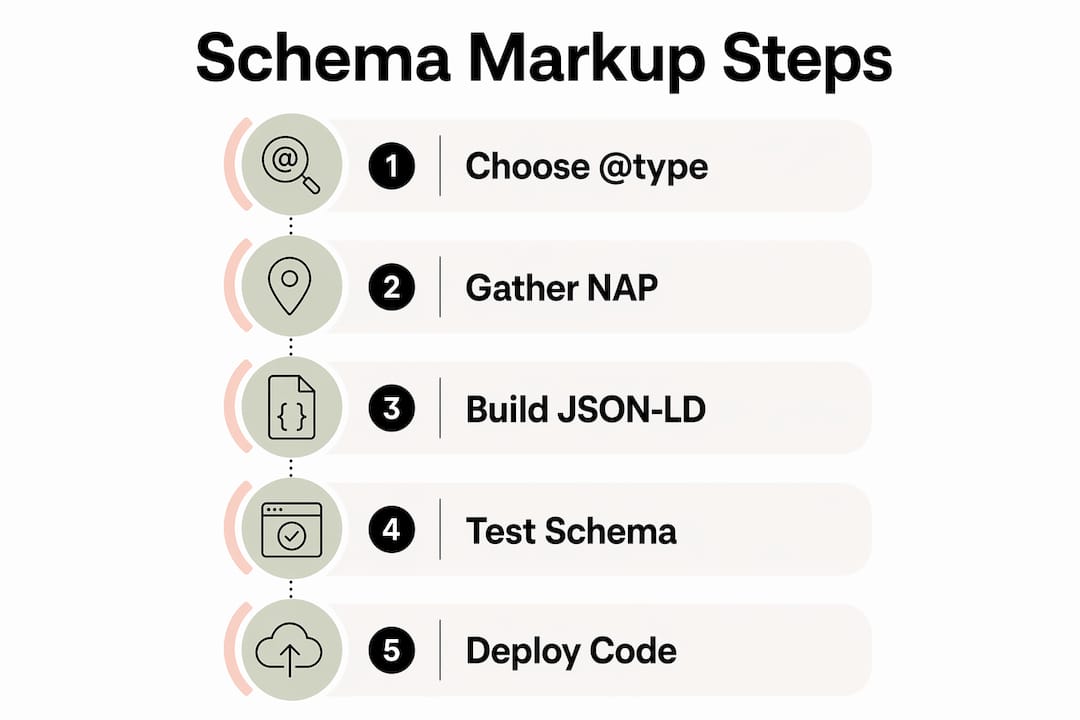
How to add local business structured data step by step
JSON-LD is the format Google recommends for structured data. It sits inside a <script> tag in your page’s <head> section and does not interfere with your visible content. Here is the process from start to finish.
-
Choose your @type. Select the most specific Schema.org subtype that matches your business. A boiler engineer is a
Plumber. A solicitor is aLegalService. A general builder may useHomeAndConstructionBusiness. Specificity matters. -
Build your core JSON-LD block. Include all four required properties plus your recommended fields. Your
addressproperty must use thePostalAddressformat withstreetAddress,addressLocality,addressRegion, andpostalCodefields. -
Deploy the code in the
<head>of your pages. Best practice places one primaryLocalBusinessblock on the homepage and specificServiceblocks on service pages. Do not duplicate the fullLocalBusinessblock across every page. -
Use
@idreferences to link entities. YourOrganizationandLocalBusinessentities should share a consistent@idvalue (typically your homepage URL). This tells search engines that all references across your site point to the same real-world entity. -
Validate before publishing. Run every page through Google’s Rich Results Test and the Schema Markup Validator. Both tools flag errors, warnings, and missing recommended fields.
| Step | Input | Output |
|---|---|---|
| Choose @type | Business category | Specific Schema.org subtype |
| Build JSON-LD block | NAP data, hours, images | Valid structured data object |
Deploy in <head> |
JSON-LD code | Schema live on page |
| Add @id references | Homepage URL | Linked entity across site |
| Validate | Live page URL | Error report and eligibility status |
Pro Tip: Google’s Rich Results Test accepts a URL or raw code. Test your JSON-LD in the code input before deploying it live. This catches syntax errors without affecting your live site.
Schema validation tools such as Google’s Rich Results Test and the Schema Markup Validator are the definitive check on whether your implementation will be recognised. Running validation after every change is not optional. It is the only reliable way to confirm your markup is working.
Common mistakes that break your business schema markup
Most schema problems fall into a small number of repeating patterns. Knowing them in advance saves significant time.
- Using a generic @type. Setting
@typetoLocalBusinesswhen a specific subtype exists wastes the classification signal. Google uses the subtype to match your business to relevant local queries. - NAP mismatches between schema and Google Business Profile. Even minor differences, such as a missing county or a differently formatted phone number, can cause Google to discount your structured data.
- Duplicating conflicting schema blocks. If your homepage and your contact page both carry full
LocalBusinessblocks with different phone numbers or addresses, search engines receive contradictory signals. - Adding too many schema types at once. Bloated markup with excessive or irrelevant schema types creates contradictions and reduces effectiveness. Add types only where they are genuinely relevant to the page content.
- Ignoring deprecated properties. Schema.org updates its vocabulary regularly. Properties that were valid two years ago may now be deprecated. Using them does not break your schema, but it wastes space and signals outdated implementation.
“Schema now acts as a fundamental structural trust layer verifying business information for AI systems, beyond just boosting rankings.” — Search Engine Land
Routine annual audits of your schema and citations prevent data drift. If you change your trading hours, move premises, or add a new phone number, your schema must be updated at the same time as your Google Business Profile.
Pro Tip: Set a calendar reminder every six months to cross-check your schema data against your Google Business Profile. Five minutes of checking prevents months of discounted visibility.
Key takeaways
Schema markup is the single most direct way to confirm your business identity to search engines and AI systems, and getting the required fields right is non-negotiable.
| Point | Details |
|---|---|
| Four required fields | @type, name, address, and telephone are the minimum for valid LocalBusiness schema. |
| Specific @type matters | Use the most precise Schema.org subtype to improve relevance in local queries. |
| NAP consistency is critical | Schema data must match your Google Business Profile exactly to avoid being discounted. |
| Validate every change | Use Google’s Rich Results Test and Schema Markup Validator after every update. |
| Audit twice a year | Regular reviews prevent data drift and maintain rich results eligibility over time. |
Schema as a trust signal, not just a ranking tactic
I have worked with enough UK service businesses to say this plainly: most of them treat schema as a box to tick rather than a structural commitment. That is a mistake I see repeatedly, and it costs them visibility they do not even know they are losing.
The shift I have noticed over the past two years is that schema clarifies local visibility for AI-driven search in a way that traditional on-page SEO simply cannot. When a user asks an AI assistant for a recommended electrician in Bristol, the systems pulling that answer are not reading your homepage copy. They are reading structured signals. If your schema is absent, inconsistent, or generic, your business either does not appear or appears with fragmented, unreliable information.
The businesses I see winning in local AI search in 2026 are not necessarily the ones with the most content. They are the ones whose digital presence is coherent. Their schema matches their Google Business Profile. Their sameAs links point to verified, active profiles. Their Service pages carry relevant schema that confirms what they actually do. That coherence is what builds trust online with both search systems and the people using them.
My honest advice: treat your schema the same way you treat your Companies House registration. Keep it accurate, keep it current, and do not wait for something to break before you check it.
— Ben
How gtwelve helps UK businesses get schema right
gtwelve works with UK trades, local service providers, and SMEs to build technically sound websites that perform in local search. Schema markup implementation is part of every website build and SEO engagement we deliver.

If your current site has no structured data, outdated schema, or mismatches with your Google Business Profile, we can audit it, fix it, and keep it aligned as your business changes. We handle the technical side so you can focus on running your business. Visit gtwelve.co.uk to find out how we can improve your local search visibility with a properly built, schema-ready website.
FAQ
What is LocalBusiness schema and why does it matter?
LocalBusiness schema is a structured data type from Schema.org that defines your business name, address, phone number, and other details in a format search engines can read directly. It improves eligibility for rich results, Knowledge Panels, and local map listings.
How do I know if my schema markup is working?
Run your page URL through Google’s Rich Results Test or the Schema Markup Validator. Both tools confirm whether your structured data is valid and flag any errors or missing recommended fields.
Does schema markup directly improve my Google rankings?
Schema markup does not directly raise your position in standard search results. It acts as a structural trust layer that confirms your business identity to search engines and AI systems, which improves rich result eligibility and local visibility.
How often should I update my schema markup?
Update your schema any time your business details change, such as new trading hours, a new address, or a new phone number. A routine audit every six months keeps your data accurate and prevents eligibility issues.
Can I use a plugin to add schema to my WordPress site?
Yes. Plugins such as Yoast SEO, Rank Math, and Schema Pro automate schema creation for WordPress sites. They reduce the need for manual JSON-LD coding and help keep your structured data synchronised across pages.
Recommended
If this sounds like your website, we can take a look.
Note 34 of 72