What is AI writing assistance? A 2026 guide
8 June 2026 · 3 min read
What is AI writing assistance? A 2026 guide

AI writing assistance is software integrated directly within your writing workflow to provide real-time grammar corrections, tone adjustments, clarity improvements, and draft generation. Tools like Grammarly and ChatGPT represent the two dominant forms of this technology, and the productivity case is already clear. MIT research shows professionals using AI wrote 40% faster and produced outputs rated 18% higher in quality. That is not a marginal gain. For content creators and professionals managing high volumes of written communication, AI writing assistance is now a practical necessity rather than an optional extra.
What is AI writing assistance and how does it work?
AI writing assistance refers to software that sits inside your existing editor and responds to your text in real time. Rather than replacing your writing environment, it augments it. You write a sentence, and the tool immediately flags a passive construction, suggests a sharper word, or offers a rewritten version with a more confident tone.
Grammarly positions its AI Writer as producing well-structured drafts in seconds, catching errors across emails, documents, and social media, and sharpening text at the sentence level. This is the core proposition of an AI writing assistant: it works where you already write, not in a separate application you have to switch to.

The underlying technology draws on natural language processing (NLP), machine learning, and large language models (LLMs). These systems are trained on vast corpora of text and learn to predict what good writing looks like in a given context. When you adjust the tone setting from “formal” to “friendly,” the model does not apply a simple rule. It recalibrates the entire output based on patterns learned from millions of examples.
It is worth distinguishing AI writing assistants from standalone AI authoring platforms. HubSpot explains that AI authoring tools use NLP, machine learning, and LLMs to generate and optimise content across formats and platforms, often operating independently of a specific editor. An AI writing assistant, by contrast, is embedded in your workflow. Think of the difference between a co-pilot in your cockpit versus a separate aircraft flying alongside you.
Key features you will find across most AI writing assistants include:
- Grammar and spelling correction with contextual awareness, not just rule-based flagging
- Tone detection and adjustment to match your audience and intent
- Clarity and conciseness suggestions that shorten verbose sentences without losing meaning
- Draft generation from a brief prompt or outline
- Rewriting tools that offer alternative phrasings at the sentence or paragraph level
Pro Tip: Use the tone adjustment feature before sending any client-facing document. A single pass from “neutral” to “confident and direct” can change how a proposal lands.
What are the main benefits of AI writing assistance?
The productivity evidence is hard to ignore. Professionals using ChatGPT wrote 40% faster and scored 18% higher on quality ratings in controlled MIT research by Noy and Zhang (2023). The quality gain matters as much as the speed gain. Faster writing that is also better writing compounds the value significantly over a working week.
“AI tools help capture and structure ideas without replacing critical thinking or creativity.” — Alex Kirshner, Slate
Beyond raw speed, the practical benefits for professionals and content creators fall into four clear categories:
- Overcoming the blank page. AI writing tools are highly effective at generating outlines and opening paragraphs, creating the momentum needed to move into a full draft. This is the single most common productivity blocker for knowledge workers.
- Consistency across formats. Grammarly’s business writing AI delivers structured drafts, shortens lengthy messages, and tailors tone to audience and intent. Whether you are writing a proposal, a follow-up email, or a LinkedIn post, the output stays on-brand.
- Reduced editing cycles. When AI catches grammar issues, weak phrasing, and structural problems during drafting, the revision stage shrinks. A document that previously needed three rounds of editing often needs one.
- Cross-application integration. Grammarly works across hundreds of apps and websites, providing AI-assisted suggestions wherever you compose text. This means the benefit is not confined to one tool or platform. It follows you into Gmail, Microsoft Word, Notion, and Slack.
For service businesses in particular, the benefit of AI writing assistance extends to client communications. Proposals, quotes, and follow-up messages written with AI support tend to be clearer, shorter, and more persuasive. That directly affects conversion. You can read more about how AI improves content across professional writing contexts in gtwelve’s 2026 guide.
How to get the most from AI writing assistance
Knowing the tool exists is not enough. How you integrate it into your workflow determines whether you gain a genuine productivity advantage or simply add another distraction. Research on best practices for AI writing tools points to several approaches that preserve cognitive focus and avoid over-reliance.
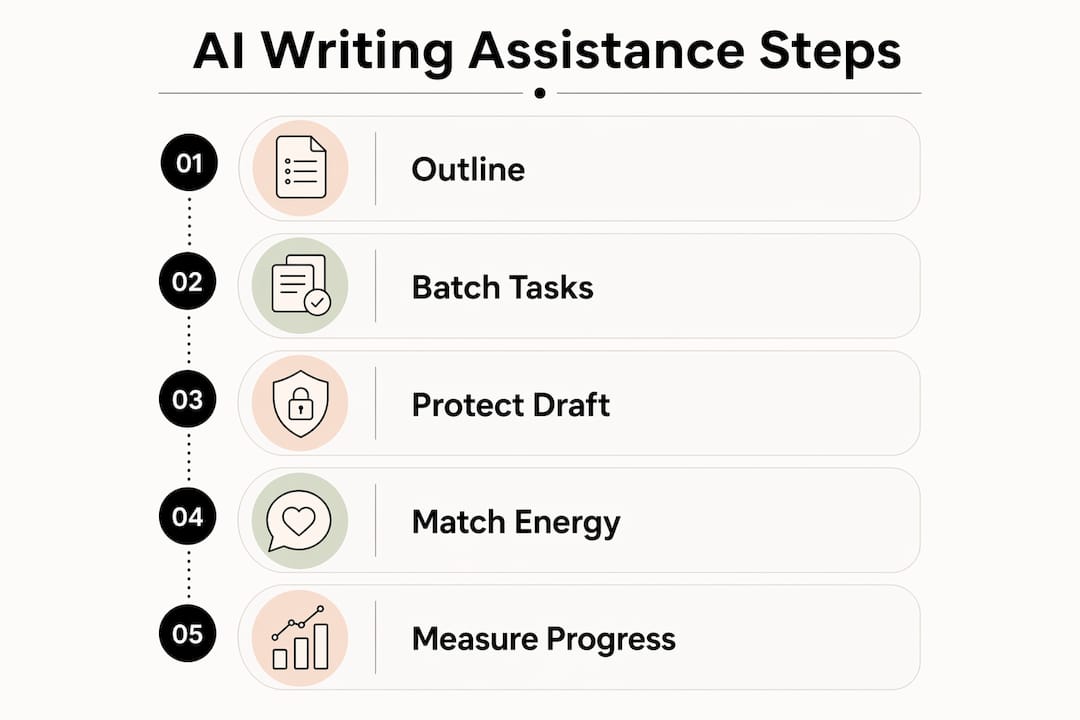
Outline before you open the AI tool. Spend five to ten minutes mapping your structure manually before asking the AI for anything. This keeps your thinking in charge of the document’s direction. The AI then fills in and polishes rather than dictates.
Batch your AI interactions. Rather than toggling between writing and prompting the AI every few sentences, set aside specific moments in your session for AI input. Write a full section, then ask the AI to review it. This protects your concentration and produces better first drafts.
Protect the first draft. The research is clear: using AI to generate your entire first draft reduces your cognitive engagement with the material. Write the first draft yourself, even if it is rough. Use AI to improve it, not to replace it. The difference in your final output quality is measurable.
Match AI use to your energy levels. Use AI-assisted editing and polishing during lower-energy periods in your day. Reserve your peak cognitive hours for original thinking and first-draft writing. This is a simple scheduling decision that most professionals overlook.
Measure before and after. Track your focused writing time and word output for two weeks before adopting an AI writing tool, then repeat the measurement two weeks after. Without a baseline, you cannot distinguish genuine productivity gains from the feeling of being busy.
Pro Tip: Set a rule that any AI-generated paragraph must be rewritten in your own words before it goes into a final document. This keeps your voice intact and forces you to engage with the content rather than just accepting it.
What are the ethical considerations around AI writing assistance?
Transparency is the central ethical issue. When AI writing assistance contributes substantially to a piece of writing, the reader or recipient may have a legitimate interest in knowing that. This is not a theoretical concern. It has practical implications for professional accountability, particularly in regulated industries.
ABA Rule 1.4 requires lawyers to keep clients informed about AI involvement in their work to manage risk and maintain transparency. This is the clearest professional standard currently in place, but the principle applies broadly. Consultants, journalists, and marketers producing AI-assisted content for clients should consider whether disclosure is appropriate.
The key considerations for any professional using AI writing tools include:
- Accuracy risk. AI writing tools can generate plausible-sounding but factually incorrect statements. Every AI-generated claim requires human verification before publication or client delivery.
- Misrepresentation. Presenting AI-generated content as entirely original human writing, particularly in contexts where that distinction matters, creates reputational and legal risk.
- Informed consent. Where a client has commissioned original writing, using AI to generate substantial portions of that work without disclosure may breach the terms of the engagement.
- Jurisdiction variation. Disclosure requirements vary by country, industry, and professional body. UK professionals should check guidance from their relevant regulatory body rather than assuming a single standard applies.
The practical answer is a short, clear disclaimer on any content where AI has played a significant role in drafting. This protects you, informs your audience, and builds trust rather than eroding it.
Key takeaways
AI writing assistance delivers measurable productivity and quality gains when integrated thoughtfully into a professional writing workflow, with the greatest value coming from human-led drafting supported by AI editing.
| Point | Details |
|---|---|
| Core definition | AI writing assistance is software embedded in your workflow providing real-time grammar, tone, and clarity support. |
| Productivity evidence | MIT research shows a 40% speed increase and 18% quality improvement for professionals using AI writing tools. |
| Best practice | Write first drafts yourself and use AI for editing and polishing to maintain quality and cognitive engagement. |
| Ethical obligation | Disclose AI involvement in client-facing or public content, particularly in regulated professions such as law. |
| Integration breadth | Leading tools like Grammarly work across hundreds of applications, making AI assistance available wherever you write. |
AI as a writing coach, not a ghostwriter
I have used AI writing tools in professional content work for long enough to have a clear view on where they genuinely help and where they quietly erode quality. The honest answer is that AI works best as an editor, not an author. When I use it to sharpen a paragraph I have already written, the result is almost always better. When I use it to write the paragraph from scratch, the result is almost always flatter.
The risk I see most often with professionals adopting these tools is the temptation to skip the hard part. The hard part is thinking. Generating a first draft with AI feels productive, but it bypasses the cognitive work that produces genuinely original ideas and strong arguments. You end up polishing something that was never really yours.
What I recommend to anyone building AI writing assistance into their workflow is to treat it the way a good editor treats a manuscript. The editor does not rewrite your book. They ask the right questions, flag the weak sections, and push you to be clearer. That is exactly what tools like Grammarly and ChatGPT do well when you use them with that frame in mind. The moment you outsource the thinking, the quality drops. Keep the thinking. Delegate the mechanics.
— Ben
How gtwelve supports professional writing workflows
If you are a service business or content professional looking to put AI writing assistance to practical use, gtwelve builds the systems that make it work in context. From drafting client proposals to polishing service page copy, AI-assisted writing tools can be connected directly into your existing workflows around automation and your existing tools.
At gtwelve, we combine content strategy, technical SEO, and AI-assisted writing support into one growth system for UK service businesses. Whether you need better website copy, sharper client communications, or a faster content production process, we can help you build it properly. Get in touch to find out what that looks like for your business.
FAQ
What is AI writing assistance in simple terms?
AI writing assistance is software that integrates with your writing environment to provide real-time suggestions for grammar, tone, clarity, and structure. Tools like Grammarly and ChatGPT are the most widely used examples.
How does AI assist with writing quality?
AI writing tools improve quality by catching grammatical errors, suggesting clearer phrasing, and adjusting tone to match your audience. MIT research by Noy and Zhang found outputs scored 18% higher in quality ratings when professionals used AI assistance.
Is AI writing assistance suitable for business use?
AI writing assistance is well-suited to business writing tasks including proposals, emails, reports, and client communications. Grammarly’s business writing AI, for example, tailors tone and shortens messages to match audience and intent.
Do I need to disclose when I use AI writing tools?
Disclosure is recommended for any client-facing or public content where AI has played a significant role. Legal professionals in particular should follow ABA Rule 1.4, which requires clients to be kept informed about AI involvement in their work.
What is the difference between AI writing assistance and AI authoring tools?
AI writing assistants operate inside your existing editor and offer real-time suggestions as you write. AI authoring tools, as described by HubSpot, generate and optimise content independently across multiple formats and platforms, often without being embedded in a specific writing environment.
Recommended
If this sounds like your website, we can take a look.
Note 46 of 72